
Finding the best gaming laptops under ₹60000 in India is harder than simply comparing processor names and RAM. Two laptops can have similar specifications but deliver different gaming performance because GPU power, cooling, display quality and the exact hardware configuration can vary significantly.
In this guide, we compare the best gaming laptops under ₹60,000 in India based on the components that matter most for gaming, including GPU performance, TGP, thermals, RAM, display and upgradeability.
As of September 2026, the Lenovo LOQ Essential 15IAX9E is one of the most interesting options at the top of the budget, while the ASUS TUF Gaming A15 FA566NFR-HN259W is a strong value pick below ₹60,000. Some older models still appear on major comparison pages, but we have not treated an old laptop as a good recommendation simply because it fits the price range.
Prices and availability checked in September 2026. Laptop prices can change quickly in India, so check the exact SKU before buying.
Related Article: Best Laptops Under Rs.50,000 in India (2026)
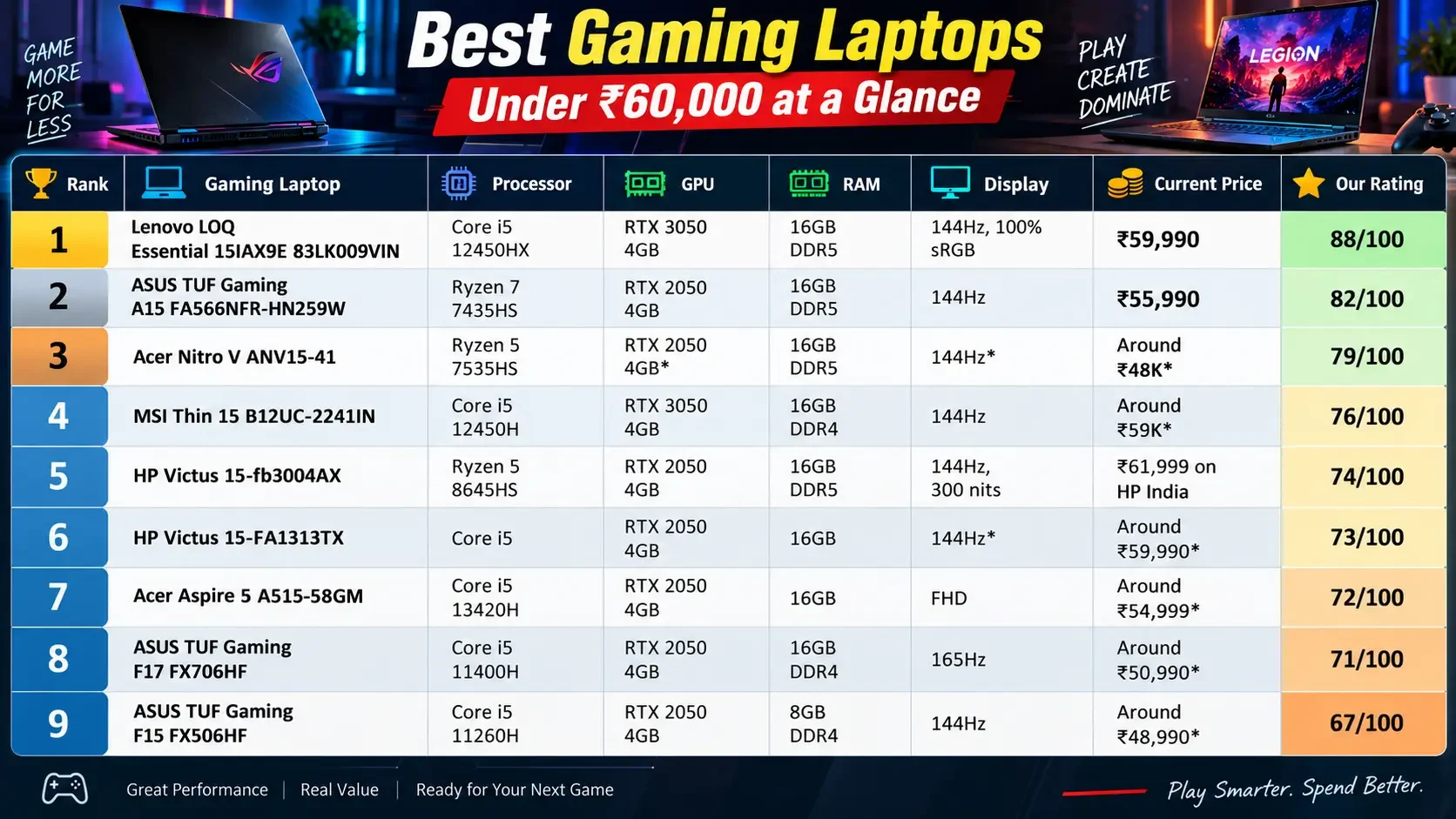
Best Gaming Laptops Under Rs. 60000 at a Glance
Our selection of the best gaming laptops under ₹60000 focuses on gaming value rather than simply counting specifications. We have considered the graphics processor, GPU power, sustained thermal performance, memory, display refresh rate, upgrade options and current price. This helps separate genuinely good gaming laptops from older models that may still appear in Indian comparison lists.
| Rank | Gaming Laptop | Processor | GPU | RAM | Display | Current Price | Our Rating |
| 1 | Lenovo LOQ Essential 15IAX9E 83LK009VIN | Core i5 12450HX | RTX 3050 A 4GB | 16GB DDR5 | 144Hz, 100% sRGB | ₹59,990 | 88/100 |
| 2 | ASUS TUF Gaming A15 FA566NFR-HN259W | Ryzen 7 7435HS | RTX 2050 4GB | 16GB DDR5 | 144Hz | ₹55,990 | 82/100 |
| 3 | Acer Nitro V ANV15-41 | Ryzen 5 7535HS | RTX 2050 4GB* | 16GB DDR5 | 144Hz* | Around ₹48K* | 79/100 |
| 4 | MSI Thin 15 B12UC-2241IN | Core i5 12450H | RTX 3050 4GB | 16GB DDR4 | 144Hz | Around ₹59K* | 76/100 |
| 5 | HP Victus 15-fb3004AX | Ryzen 5 8645HS | RTX 2050 4GB | 16GB DDR5 | 144Hz, 300 nits | ₹61,999 on HP India | 74/100 |
| 6 | HP Victus 15-FA1313TX | Core i5 | RTX 2050 4GB | 16GB | 144Hz* | Around ₹59,990* | 73/100 |
| 7 | Acer Aspire 5 A515-58GM | Core i5 13420H | RTX 2050 4GB | 16GB | FHD | Around ₹54,999* | 72/100 |
| 8 | ASUS TUF Gaming F17 FX706HF | Core i5 11400H | RTX 2050 4GB | 16GB DDR4 | 165Hz | Around ₹50,990* | 71/100 |
| 9 | ASUS TUF Gaming F15 FX506HF | Core i5 11260H | RTX 2050 4GB | 8GB DDR4 | 144Hz | Around ₹48,990* | 67/100 |
| 10 | Lenovo IdeaPad Gaming 3 15IHU6 | Core i5 11320H | RTX 2050 4GB | 8GB DDR4 | FHD | Around ₹50,990* | 63/100 |
*Price, stock or exact panel/GPU configuration can vary by seller and SKU. We have separated strong current buys from older or availability driven options instead of treating all ten as equal.
1. Lenovo LOQ Essential 15IAX9E: Best Gaming Laptop Under Rs. 60,000
Our score: 88/100
The Lenovo LOQ Essential 15IAX9E 83LK009VIN is the laptop I would buy first when the full ₹60,000 budget is available.
Lenovo India currently lists this exact model at ₹59,990, with a Core i5 12450HX processor, 16GB RAM and 512GB SSD. The configuration uses an RTX 3050 A 4GB GPU, which gives it a stronger starting point for gaming than many RTX 2050 machines in the same bracket.
The display is another major reason this laptop ranks first. The exact configuration is built around a 15.6 inch Full HD 144Hz panel, and the platform specification identifies a 300 nit, 100% sRGB option. That combination makes the LOQ interesting not only for gaming but also for college work, content creation and general productivity.
Why it is our top pick
The strength of the LOQ is balance.
You get a dedicated RTX GPU, 16GB memory, an HX series processor and a high refresh rate display without moving beyond the ₹60,000 ceiling.
Just as importantly, the RTX 3050 A should not be judged only by its name. Lenovo’s configuration gives the GPU a defined power target, which is one reason we look at TGP instead of comparing GPU names in isolation.
What we like
- RTX 3050 A 4GB
- Core i5 12450HX
- 16GB RAM
- 144Hz display
- Strong colour coverage on the exact display configuration
- Good platform for future upgrades
- Good gaming plus productivity balance
What could be better
The GPU still has only 4GB of VRAM, which is an important limitation for demanding new games. It is also a relatively performance focused laptop rather than a lightweight machine for daily travel.
Best for
Gaming, college, coding, editing and buyers who want one laptop for everything.
2. ASUS TUF Gaming A15: Best Value Gaming Laptop Under Rs. 60,000
Our score: 82/100
The ASUS TUF Gaming A15 FA566NFR-HN259W makes a very strong case for buyers who do not want to spend the entire ₹60,000 budget.
The exact model uses an AMD Ryzen 7 7435HS, 16GB DDR5 memory, 512GB SSD and an NVIDIA RTX 2050. ASUS lists the GPU at up to 1670MHz and 60W, with Dynamic Boost up to 70W. The display is a 15.6 inch Full HD 144Hz IPS level panel.
Current 91mobiles pricing puts this configuration at ₹55,990, and ASUS shows the same model as available through Flipkart.
That makes the TUF A15 particularly attractive for someone who wants a proper gaming laptop while keeping roughly ₹4,000 to ₹5,000 in reserve.
The big strength: GPU power
The RTX 2050 is not a high end GPU, but the TUF’s implementation is important. ASUS specifies 60W plus Dynamic Boost to 70W.
This is a perfect example of why a laptop’s graphics specification should include more than just the GPU model.
The biggest compromise
The screen.
ASUS rates this panel at 62.5% sRGB and 45% NTSC. That is perfectly usable for gaming and everyday work, but it is not as attractive for colour sensitive editing as the Lenovo LOQ’s stronger display configuration.
Best for
Esports gaming, students, everyday gaming and buyers looking for the best value below ₹60K.
3. Acer Nitro V ANV15-41: A Great Deal When Available
Our score: 79/100
The Acer Nitro V ANV15-41 is one of the most interesting laptops in this price class, particularly when the 16GB configuration is available at a genuine sub ₹50K price.
Current Indian comparison listings show an ANV15-41 configuration with Ryzen 5 7535HS, 16GB DDR5, 512GB SSD and RTX 2050 around ₹48,067, but that particular listing is currently out of stock.
That is why we would not rank it above a laptop that you can actually purchase today at a similar price.
Still, the hardware platform deserves attention.
An independent LaptopMedia review of the ANV15-41 found a two fan cooling system with three heat pipes and multiple heat spreaders. The tested unit maintained around 3.80GHz on the Ryzen 5 7535HS during prolonged stress, although CPU temperatures could reach about 92°C under long heavy loads.
The upgrade options are also unusually good for a budget gaming machine. The reviewed platform has two DDR5 SODIMM slots and two M.2 storage slots.
Why it remains on our list
If Acer or a major retailer brings the right 16GB configuration back around ₹48,000 to ₹50,000, the Nitro V becomes one of the strongest value options in this entire bracket.
Best for
Budget gamers who find a genuine 16GB configuration in stock.
4. MSI Thin 15 B12UC-2241IN: RTX 3050 With a Catch
Our score: 76/100
The MSI Thin 15 is one of the laptops that demonstrates exactly why this article does not rank machines by GPU name alone.
The B12UC-2241IN combines a Core i5 12450H, RTX 3050 4GB, 16GB DDR4 and a 15.6 inch Full HD 144Hz display. MSI’s official specification sheet says the RTX 3050 has a 45W maximum graphics power with Dynamic Boost.
That number matters.
A buyer looking only at the words “RTX 3050” could assume that this machine automatically beats every RTX 2050 laptop under ₹60,000.
That is not a safe assumption.
NVIDIA itself lists the laptop RTX 3050 across a 35W to 80W GPU subsystem power range, so different laptops can operate the same GPU family very differently.
Upgradeability is a strong point
MSI provides two DDR4 memory slots with support up to 64GB and a 512GB NVMe SSD. The system also provides additional expansion options, depending on the exact service configuration.
Verdict
A reasonable option for buyers who specifically want RTX 3050 features and strong memory upgrade potential, but we would not pay a large premium for it over a better configured alternative.
Best for
Buyers who value upgradeability and want RTX 3050 hardware.
5. HP Victus 15-fb3004AX: Strong All Round Hardware
The HP Victus 15-fb3004AX is another interesting configuration because HP gives it a Ryzen 5 8645HS, RTX 2050 4GB, 16GB DDR5 and a 512GB SSD.
The official HP India listing also specifies a 15.6 inch FHD IPS 144Hz display with 300 nits, and confirms upgradeable RAM.
The problem is price.
HP currently lists this configuration at ₹61,999, placing it slightly above our ₹60,000 ceiling.
That makes it a watch during sales, rather than a core recommendation for a strict ₹60K article.
Buy it when
A genuine retail sale takes the exact configuration to ₹60,000 or below.
Best for
Gaming plus productivity and buyers who value a newer Ryzen platform.
6. Other Gaming Laptops Worth Watching
There are several other machines that still appear in Indian comparison databases.
The HP Victus 15-FA1313TX is listed around ₹59,990 with a 12th Gen Core i5, 16GB RAM and RTX 2050, while the Acer Aspire 5 A515-58GM appears around ₹54,999 with a Core i5 13420H, 16GB RAM and RTX 2050.
The ASUS TUF Gaming F17 FX706HF is another value oriented option with Core i5 11400H, 16GB DDR4 and RTX 2050, while the TUF F15 FX506HF is commonly listed with 8GB RAM and RTX 2050.
These machines can still make sense at the right price, but age and configuration prevent them from challenging the LOQ and TUF A15 as our main recommendations.
7. Best Gaming Laptops Under Rs. 60,000: What We Are Actually Ranking
A gaming laptop should not win simply because it has:
- a newer CPU name
- more CPU cores
- a high refresh rate
- a large SSD
- the words “Gaming” or “Performance” in the product title
For this guide, our priority is:
GPU performance → GPU power → cooling → RAM → display → upgradeability → total value
That is much closer to the buying decision a gamer actually faces.
8. Our Gaming Laptop Scoring System
We use a dedicated 100 point model for this guide.
| Category | Weight |
| GPU gaming performance | 30 points |
| GPU power / TGP | 15 points |
| Cooling and sustained performance | 15 points |
| CPU gaming performance | 10 points |
| RAM capacity and configuration | 8 points |
| Gaming display | 8 points |
| Upgradeability | 7 points |
| Storage | 3 points |
| Build, keyboard and ports | 2 points |
| Price to performance | 2 points |
| Total | 100 points |
This prevents a laptop with a powerful sounding processor and weak graphics implementation from automatically beating a better gaming machine.
9. GPU is the Most Important Component
For gaming, the graphics processor matters more than the processor once the CPU is capable enough for the games you want to play.
At around ₹60,000, most worthwhile options fall into the RTX 2050 and RTX 3050 class.
NVIDIA’s official specifications show that laptop RTX 3050 implementations can range from 35W to 80W, which demonstrates why the GPU name alone does not tell you the whole story.
That is why our comparison table includes GPU power wherever the manufacturer provides it.
10. RTX 2050 vs RTX 3050: Which One Should You Buy?
The RTX 3050 is generally the stronger GPU family, but that does not mean every RTX 3050 laptop is automatically the better purchase.
Consider two examples from this price range.
The ASUS TUF A15 uses an RTX 2050 configured at 60W with Dynamic Boost up to 70W.
The MSI Thin 15 uses an RTX 3050 with 45W maximum graphics power.
So the comparison should not stop at:
RTX 3050 > RTX 2050
Instead, ask:
Which laptop has the better overall GPU implementation?
The answer can change depending on power limits, thermals and the exact game.
11. Why TGP Matters in a Gaming Laptop
TGP is one of the most overlooked specifications on budget gaming laptops.
The simplest way to think about it is this:
TGP tells you how much power the laptop allows the GPU to use within its thermal and electrical design.
A more powerful implementation can have more room to sustain GPU performance, assuming the cooling system can handle the heat.
This does not mean “higher TGP always wins”. Cooling, GPU design, CPU power allocation and chassis design all matter.
It does mean you should never see:
RTX 3050
and assume:
same performance as every other RTX 3050 laptop.
NVIDIA’s own laptop GPU specifications make this variation clear.
12. Cooling Can Change Long Gaming Sessions
A laptop can produce impressive performance for a short benchmark and still struggle under a long gaming session.
That is why we give thermals 15% of the overall score.
The Acer Nitro V ANV15-41 provides a useful example. LaptopMedia’s testing found a cooling system using two fans, three heat pipes and multiple heat spreaders. The review found good sustained behaviour from the platform, but CPU temperatures could reach around 92°C during long heavy loads.
That does not make the laptop bad.
It simply tells us that sustained gaming has to be evaluated separately from a single peak benchmark result.
13. Is 16GB RAM Necessary for Gaming in 2026?
For a new gaming laptop around ₹60,000, 16GB should be the target.
Eight gigabytes can still run many games, but Windows, browser tabs, game launchers, Discord, recording tools and background applications can quickly consume available memory.
A laptop with 16GB also gives you much more breathing room as game requirements increase.
That is why a cheap 8GB configuration should not automatically beat a slightly more expensive 16GB model.
Our recommendation
16GB = preferred
8GB = acceptable only with good upgrade support
14. Is a 144Hz Display Necessary?
For a gaming laptop, a 144Hz panel is one of the most sensible upgrades over a standard 60Hz screen.
The higher refresh rate can make fast camera movement and competitive games feel considerably smoother.
But refresh rate is only one part of the display.
Also check:
Brightness
Colour coverage
Response behaviour
Panel type
A 144Hz display with poor colour reproduction is still a compromise for people who also use the laptop for editing or creative work.
15. Which Laptop Has the Better Display?
The Lenovo LOQ has a meaningful advantage here.
The exact configuration is listed with a 144Hz panel and a 300 nit, 100% sRGB option.
The ASUS TUF A15’s display is also 144Hz, but ASUS rates it at 62.5% sRGB and 45% NTSC.
For gaming alone, both can be useful.
For gaming plus photo editing, design or content work, the Lenovo is more attractive.
16. Upgradeability Matters More Than You Think
A gaming laptop has a longer useful life when RAM and storage can be expanded.
The Acer Nitro V is particularly strong in this area. Its reviewed platform uses two DDR5 SODIMM slots and two M.2 slots, giving the owner room to expand later.
MSI’s Thin 15 also provides two DDR4 memory slots with support up to 64GB.
Before buying any gaming laptop, check:
RAM slots
Maximum supported RAM
Number of SSD slots
Whether the second slot is occupied
Whether an expansion bay is present
17. Best Gaming Laptop Under Rs. 60000 for Students
Winner: Lenovo LOQ Essential
Students need more than gaming performance.
The laptop may be used for coding, presentations, research, web browsing, editing and college projects during the day, followed by gaming in the evening.
The LOQ’s combination of 16GB RAM, Core i5 12450HX, RTX 3050 A and its strong display configuration makes it a particularly good fit for that mixed workload.
The ASUS TUF A15 is the better option when keeping the purchase below ₹60,000 is more important.
18. Best Gaming Laptop Under Rs. 60000 for Valorant and Esports
Winner: ASUS TUF Gaming A15
Esports games do not require the same graphics power as demanding AAA titles.
The TUF A15’s RTX 2050 and 144Hz display make it a sensible option for competitive gaming, while its 70W maximum GPU configuration with Dynamic Boost gives the RTX 2050 a stronger implementation than many thin budget machines.
The Lenovo LOQ also makes a strong case, particularly if you want a better display and a stronger GPU class.
19. Can You Play GTA V on a Rs. 60,000 Gaming Laptop?
Yes.
A proper gaming laptop in this price category is more than capable of handling GTA V.
The more important question is how you approach newer and more demanding games.
At this budget, the sensible target is:
1080p gaming
with settings adjusted according to the individual game.
There is no reason to promise one fixed FPS figure across every laptop because GPU power, cooling, drivers and game settings all affect the result.
20. Can You Play Modern AAA Games Under Rs. 60,000?
Yes, but expectations matter.
Do not buy a ₹60,000 laptop expecting it to behave like a ₹1 lakh plus gaming machine.
A sensible approach is:
Competitive games: high frame rates
Older AAA games: medium to high settings
Demanding new AAA games: adjusted settings at 1080p
Ray tracing: use selectively rather than making it the purchase priority
For this price range, good raster gaming performance is much more important than chasing every advanced graphics feature.
21. Gaming Laptop vs Normal Laptop at Rs. 60,000
A normal laptop around ₹60,000 may be lighter, quieter and better for battery life.
A gaming laptop normally gives you:
- Dedicated graphics
- Higher sustained performance
- Better cooling hardware
- High refresh rate displays
- More upgrade flexibility
- Better gaming performance
So the decision is simple.
Buy a gaming laptop when:
Gaming is an important use case.
You use GPU accelerated software.
You want one machine for gaming and demanding work.
Buy a normal laptop when:
Portability is your biggest priority.
Battery life matters more than gaming.
You mainly use Office, browsing, streaming and light applications.
22. Gaming Laptop Features That Actually Matter
When comparing two laptops, prioritise these specifications.
GPU
Start here.
TGP
Find the manufacturer’s listed GPU power.
Cooling
Look for independent testing when available.
RAM
16GB is the sensible starting point.
Display
144Hz is a good target, but check brightness and colour coverage too.
SSD
512GB is the practical starting point, but game sizes make future expansion useful.
Upgradeability
A second SSD slot or additional RAM support can significantly extend the laptop’s useful life.
23. Gaming Laptops We Would Not Recommend at This Price
Several machines continue to appear on Indian comparison pages even though they are old or poorly configured.
The Lenovo IdeaPad Gaming 3 15IHU6 is one example. Current listings still show versions using an 11th Gen Core i5, RTX 2050 and only 8GB RAM.
Older GTX 1650 models are even harder to justify when newer RTX machines are available around the same price.
We would also avoid:
8GB only configurations without easy upgrades
Unknown GPU TGP
Old CPUs paired with old graphics
Out of stock “bargains”
Listings where the exact SKU is missing
24. Why Some Popular 60K Lists are Misleading
A major issue with budget laptop comparison pages is that they often mix:
- current models
- old models
- out of stock models
- discontinued configurations
- different RAM variants
- different GPU variants
Gadgets 360’s current under ₹60K gaming page, for example, still includes models such as HP Victus 15 from 2022, HP Victus 16 from 2023, ASUS F560UD, ASUS FX503VD and Dell Inspiron 5577.
That does not mean those laptops are inherently bad.
It means they are not automatically appropriate recommendations for someone spending ₹60,000 on a gaming laptop in 2026.
Freshness matters.
25. How to Check a Gaming Laptop Before Buying
Before you click the Buy button, spend two minutes checking the exact configuration.
Step 1: Check the full model number
Do not rely only on “TUF A15” or “LOQ”.
Step 2: Check the GPU
Confirm RTX 2050, RTX 3050, RTX 3050 A or another variant.
Step 3: Check TGP
Look for the manufacturer specified graphics power.
Step 4: Check RAM
Prefer 16GB.
Step 5: Check the display
Confirm refresh rate, brightness and colour coverage.
Step 6: Check upgrade options
Look for additional RAM and SSD slots.
Step 7: Check price
Compare the exact SKU across more than one major retailer.
Step 8: Check availability
A low price means nothing if the product is unavailable.
Our Final Ranking
After applying our gaming focused scoring system, this is how we would rank the current market.
| Position | Laptop | Score | Who Should Buy It? |
| 🥇 1 | Lenovo LOQ Essential 15IAX9E | 88/100 | Best overall |
| 🥈 2 | ASUS TUF Gaming A15 | 82/100 | Best value |
| 🥉 3 | Acer Nitro V ANV15-41 | 79/100 | Great deal if available |
| 4 | MSI Thin 15 B12UC | 76/100 | RTX 3050 + upgradeability |
| 5 | HP Victus 15-fb3004AX | 74/100 | Watch for sale |
| 6 | HP Victus 15-FA1313TX | 73/100 | Older but usable |
| 7 | Acer Aspire 5 A515-58GM | 72/100 | Productivity crossover |
| 8 | ASUS TUF Gaming F17 | 71/100 | Large display |
| 9 | ASUS TUF Gaming F15 | 67/100 | Only after RAM upgrade |
| 10 | Lenovo IdeaPad Gaming 3 | 63/100 | Too old for the price |
Which Gaming Laptop Should You Buy?
Buy the Lenovo LOQ Essential if you want the best overall package.
It has the strongest balance of graphics capability, 16GB RAM, processor performance and display quality at the top of the budget. Lenovo currently lists the exact 83LK009VIN configuration at ₹59,990.
Buy the ASUS TUF A15 if you want better value under ₹60K.
At around ₹55,990, the combination of Ryzen 7 7435HS, 16GB DDR5 and RTX 2050 makes it a strong lower cost gaming machine. ASUS also specifies up to 70W GPU power with Dynamic Boost.
Wait for the Acer Nitro V if you find it near ₹48K to ₹50K.
Its combination of 16GB DDR5, RTX graphics and strong upgradeability makes it a very attractive deal when genuinely in stock.
Consider MSI Thin 15 when upgradeability matters.
Its RTX 3050 is appealing, but the 45W maximum graphics power means you should not judge it purely by the GPU name.
Frequently Asked Questions
Which is the best gaming laptop under ₹60,000 in India in 2026?
The Lenovo LOQ Essential 15IAX9E 83LK009VIN is our top pick. The exact configuration currently sells for ₹59,990 and combines a Core i5 12450HX, RTX 3050 A 4GB, 16GB RAM and 512GB SSD.
Which is the best gaming laptop under ₹55,000?
The ASUS TUF Gaming A15 FA566NFR-HN259W is one of the strongest options around this price. It uses Ryzen 7 7435HS, 16GB DDR5, RTX 2050 and a 144Hz display.
Is RTX 3050 better than RTX 2050?
Generally, the RTX 3050 is the stronger GPU class, but laptop implementations can differ substantially because GPU power limits vary. NVIDIA’s specifications show the laptop RTX 3050 across a broad 35W to 80W power range.
Is 16GB RAM enough for gaming?
Yes. For a new gaming laptop in this price bracket, 16GB is the amount we recommend.
Is 8GB RAM enough?
It can run many games, but we prefer 16GB. An 8GB model should have a good upgrade path before you consider it.
Is 144Hz good for gaming?
Yes. A 144Hz display is a sensible target for a gaming laptop, especially for fast competitive games.
Does TGP really matter?
Yes. TGP helps explain how much power a laptop allows the GPU to use. It is one of the reasons two laptops with the same named GPU can offer different gaming performance.
Can I play GTA V on a ₹60,000 gaming laptop?
Yes. This class of laptop is suitable for 1080p gaming, with the exact settings and frame rate depending on the hardware configuration and game.
Can a ₹60,000 laptop run modern AAA games?
Yes, but you should expect to adjust graphics settings for demanding newer games. This budget is better suited to entry level 1080p gaming than maximum quality settings.
Which is better for gaming, LOQ or TUF A15?
The LOQ is our better overall choice because of its stronger GPU class and display configuration. The TUF A15 is the better value option when spending less than ₹60,000 is the priority.
Should I buy an older gaming laptop to save money?
Only when the price is substantially lower and the hardware still represents good value. At ₹60,000, an older GTX 1650 or 8GB machine is difficult to justify when newer RTX configurations are available.
Conclusion
The best gaming laptop under ₹60,000 is not simply the laptop with the biggest processor or the GPU with the best sounding name.
Gaming performance comes from the complete implementation.
Look at:
GPU → TGP → cooling → RAM → display → upgradeability → price
That is why the Lenovo LOQ Essential 15IAX9E takes our top position, while the ASUS TUF Gaming A15 is our value recommendation.
The most important buying lesson from this segment is simple:
Never buy a gaming laptop by GPU name alone. Check the exact SKU, GPU power, cooling, RAM and display before paying.
Prices and stock can change quickly in India. Always verify the exact configuration and current seller price before purchasing.